Skip to content

The White Pages Posts

Power BI Report Server Completes the Vision for On-Premises Reporting

Microsoft today made available the August 2017 preview of Power BI ReportServer 2017. This preview includes the long awaited support of embedded data models, as well as the ability to render Excel reports natively. This is a major step forward, because with this release, Microsoft has completed its vision for its on-premises reporting platform that it first articulated in October of 2015.

Excel content being rendered in Power BI Reporting Server

The big news at the time was that the platform was stated to be SQL Server Reporting Services (SSRS). Not SharePoint, not PerformancePoint, but SSRS. SSRS was a mature product that quite competently provided a platform for operational reports. What it needed was some modernization and the addition of some analytical and self-service reporting capabilities. Several of these capabilities were subsequently included with the release of SSRS 2016.

Gone would be the days of configuring complex SharePoint farms just to be able to work with analytical reports (ie Power View, Excel). New Features were being added to SSRS to make it a complete platform for both analytical and operational reports.

The Vision

The roadmap articulated four different report types, 3 of them analytical (by my definition) and one of them operational. These three types line up with reporting tools in the Microsoft BI stack:

Name Type Primary authoring tool ext
Paginated Operational SSRS Report Builder
SQL Server Data Tools
.RDL
Interactive Analytical Power BI Desktop .PBIX
Mobile Analytical Mobile Report Designer .RDLX
Analytical Analytical Excel .XLSX

Therefore, reading between the lines, in order to be a complete reporting platform, SSRS needed to be able to render all of these report types. Paginated reports were of course always native to SSRS, and the roadmap announced that Mobile reports would be included in SSRS 2016 through the integration of Datazen. The roadmap further committed to SSRS being able to render Power BI files in the future.

SSRS 2016

SSRS shipped with some significant modernization improvements, including a much awaited HTML5 rendering engine, and it included Mobile Reports. Mobile reports are delivered through the Power BI mobile application, and SSRS visuals can be pinned to Power BI dashboards.

Significant plumbing was done to move the platform forward in 2016, but it still only rendered 2 of the 4 report types.

In November 2016, it was further announced that the 2016 version of SSRS running in SharePoint Integrated mode would be the last. Moving forward, Reporting Services will only run in Native Mode. In the same announcement. In the same announcement, as I noted in another post, for the first time, the SSRS team committed to providing Excel report rendering capability as well.

Power BI Reporting Server

We first saw the on premises rendering of Power BI reports in the first community preview of SSRS V.Next in the fall of 2016. Those previews required that the reports be directly connected to SSAS tabular models, but they were ground-breaking just the same. A user could be totally disconnected from the web, and still render Power BI reports.

In May of 2017, Power BI Report Server (PBIRS) was announced. A less confusing name could have potentially been SSRS Premium, because that is in essence what it is. PBIRS is everything that SSRS is, plus the ability to render Power BI reports. SSRS will continue forward as a product without Power BI rendering capabilities. It is just a licensing distinction.

The release today of the August 2017 preview of PBIRS allows for embedded data models, and therefore a much wider breadth of capabilities. These models cannot be automatically refreshed yet, but they will upon release. This is, after all, just a preview. If you need automatic refresh of these data models in the meantime, there is an excellent third party solution to do this: PowerPivot Pro’s Power Update.

The inclusion of Excel report rendering capabilities means that PBIRS is a complete report rendering platform, more complete even that the Power BI cloud service.

Moving Forward

Now that the basic on-premises capability has been provided, SSRS/PBIRS needs to pay attention to paying back the debt that it incurred when SharePoint Integrated mode was deprecated. Chief among these features is the SSRS web part. The lack of a decent web part is a blocker for many organizations to move forward with this strategy. Some migration tools to move from Integrated to Native mode (like this one that migrates in the other direction) would be highly useful as well.

Now with on-premises covering all the bases, it’s easy to spot a glaring hole in the cloud Power BI offering. While it supports all three types of analytical reports, there is currently no way to render operational reports in the cloud. Until this capability is provided, it appears that on-premises will have the most complete solution.

2 Comments

Power BI Embedded is not for Embedding Power BI Reports

NOTICE Sept 17 2017 – The central thrust of this post is incorrect. I am leaving it here, because it still contains valid information, but for an update, please go to this article –  Which Premium SKU is Needed to embed Power BI Reports in SharePoint and Microsoft Teams

I have run into this point of confusion several times since the GA of the Power BI Premium SKU. As I mentioned in my post about licensing, the Power BI web part for SharePoint requires the user viewing the report to have a Pro license. Alternatively, if the organization has purchase Power BI premium capacity, and the report has been deployed to that capacity, then all organizational users will be able to view the report in the web part.

The initial announcement about Premium licensing laid out 5 different SKUs for premium, P1, P2 and P3. These SKUs are the “normal” SKUs that are intended to be used by Power BI customers. The “P” stands for Premium. Subsequently, 3 additional SKUs were announced at the Data Insights summit to be used by ISVs. These SKUs are EM1, EM2, and EM3. The “EM” stands for embedded. The embedded in this case means Power BI embedded. That’s where the confusion sets in.

Power BI Embedded is the ISV offering for Power BI. With Power BI embedded, software vendors can use Power BI as the reporting engine in their application. A number of vendors have taken advantage of this capability in the recent past including Nintex with their Hawkeye product, and ourselves with tyGraph for Yammer Reporting. With Power BI embedded, all of the processing for the application is done in the vendor’s Power BI tenant. Customers don’t require a Power BI license of any sort to use the applications. Recently, Power BI embedded has moved to a premium model as well, which is why the EM SKUs exist. They are for purchase by software vendors to power their own applications.

If we have a look at the pricing for each of these SKUs (in $US/month), we can see that the EM SKUs are significantly cheaper, but they also come with the important restriction that they can ONLY be used by ISVs.

Capacity Node Cores Back end cores Front end cores

Cost

P1 8 4 cores, 25 GB RAM 4 cores

$4,995

P2 16 8 cores, 50 GB RAM 8 cores

$9,995

P3 32 16 cores, 100 GB RAM 16 cores

$19,995

EM1 1 0.5 cores, 3 GB RAM 0.5 cores

$625

EM2 2 1 core, 5 GB RAM 1 core

$1,245

EM3 4 2 cores, 10 GB RAM 2 cores

$2,495

It may be natural to think that because your goal is to “embed” a Power BI report in SharePoint, that you will be able to use one of the cheaper, “embedded” SKUs. Microsoft loves to overload terms when they name things, and this is one of those times that this tendency leads to confusion. Make no mistake, in order to embed a Power BI report in a SharePoint page, and to have other users be able to view it, you will need to have a Pro license, and your users will either need Pro licenses as well, OR your organization will need to have purchased a Power BI Premium “P” SKU, not an “EM” SKU.

5 Comments

What License is Needed to Use the Power BI Web Part?

The Power BI web part is now a part of SharePoint online for the majority of Office 365 users. This web part allows Power BI reports to be embedded on SharePoint pages, putting them in greater context. These web parts are rendered on the client, not on the server like old style web parts, which means that they are rendered by the consuming user, not the server. This means that in order for the report to render properly, the user needs to not only have access to the report, but also needs to be licensed for it.

The Power BI web part is a feature that requires a Pro license for both producers and consumers. This actually makes sense given that any sharing features in Power BI require Pro. Also, given that the consuming user must have access to the report, the report will be contained in a Group workspace, and Group workspaces themselves require a Pro license. So, what happens when a non Pro user opens a SharePoint page containing a Power BI web part report?

Quite simply, the content doesn’t show up.

Premium Capacity

However, on June 1, 2017, the premium pricing model for Power BI became available. Premium allows organizations to purchase premium capacity in the service. When reports are deployed to this premium capacity, users can access these reports without a Pro license. The act of publishing the report still requires a Pro license, but viewing it does not. Therefore, the Pro requirement for the web part goes away if the report is deployed to premium capacity.

This is in fact how it works. To date, I have seen no official announcement or post from Microsoft on this topic. The closest thing is a response to a forum post in the Power BI community forums:

“If the if the user that is trying to consume the embedded report does not have a Power BI Pro license but is part of a Power BI Premium instance, same viewer rights apply meaning that the user can view the report but collaboration features such as Analyze from Excel are not available, in line with regular Power BI Premium related features.”

The bottom line is that in most cases, all users, both producers and consumers will need a Power BI Pro license to be able to use the Power BI web part. The only time that this is not the case is when an organization has purchased premium capacity, and the report is deployed to that capacity. In that case, only the producer requires a Pro license. It should also be noted that in this case,  some features (like export data) will still not be available to the free users.

8 Comments

Power BI Time Values in the Browser are Different Than Those in the Desktop

Have you ever had this experience? You build up your Power BI report using Power BI Desktop, and then when you publish and view the same report in the service, the date/time values are off by a set number of hours. I certainly run into this often enough that it warrants a blog post.

That you’ll notice is that this offset corresponds with the difference between your time zone and UTC (Coordinated Universal Time), the universal time standard. Now, you’ll notice that I didn’t say GMT (Greenwich Mean Time) which many people take to be the time standard, but the difference is that UTC is a time standard, and GMT is a time zone. GMT observes daylight savings time, and UTC does not – it remains constant. In my case, my time zone is Eastern, which is 4 hours behind UTC in the summer, and 5 hours behind in the winter. It is always 5 hours behind GMT. This distinction becomes important as you’ll see.

Coming back to our problem, we will see this problem if we have used the Date/Time/Timezone property in a Power BI Query (or a Power Query in Excel). When one of these column types are converted to Date/Time, the value is automatically localized. The reason that we see the different values is that when it is localized in Power BI Desktop, the machine’s time zone is used to perform the conversion. When this conversion happens in the Power BI service, UTC is used, and this results in different times being used in the browser. This difference can easily throw of any measures that depend are based on time values.

Column as Date/Time/Timezone

Same column as Date/Time

Further complicating things is the fact that DAX (Power Pivot) has no concept of Date/Time/Timezone and all columns of that type are brought into the model without the automatic conversion to local. So, how do we deal with this discrepancy?

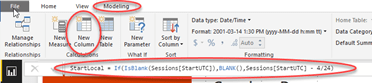
We can’t rely on the Power BI service to automatically show the viewer the correct time for the location they happen to be in, so we need to be specific about the time zone that we’re working with. In my case, I need to do this for my tyGraph for Twitter reports, like this one for Microsoft Ignite 2017, or most recently in this session browser for Ignite. For these types of reports, I adjust the times to match the time zone of the events themselves. To do this, I use the modelling capabilities in Power BI desktop to create a new calculated column in the same table that contains the UTC based date.

In DAX, time calculations are done in decimal fractions of a day. Therefore, to create a new column named StartLocal by subtracting 4 hours from a date/time column named StartUTC in a table named Sessions, the formula is:

StartLocal = Sessions[StartUTC]) - 4/24

If the source column contains null or blank values, they will be returned as 1899-12-30 4:00 AM using the formula above, so it’s a good idea to test for this case and return nulls when appropriate. The above formula then becomes:

StartLocal = If(IsBlank(Sessions[StartUTC]),BLANK(),Sessions[StartUTC] - 4/24)

This calculation will reliably return the time in Eastern Daylight Time (UTC -4) for a column that has UTC date/time values in both the Desktop and in the service. If all subsequent time calculations are based on this column, then it is a simple matter of substituting in the appropriate UTC time offset to the calculation above to show the time in a desired time zone.

It would be nice if the report would allow us to specify a “home” time zone with which to base all conversions on. Time zone could then be a property of the report. Until such a time as that happens, this should prove a suitable, if complicated workaround.

4 Comments

Turkish Airlines Fail – A Case Study in Terrible Customer Service

This will be one of my rare non-technical travel posts. After departing the European Collaboration Summit 2017, my wife Olivera and I headed to South Africa for a holiday, and to attend the Share Conference in South Africa. Our travel plans got suddenly turned upside down after leaving Zagreb, and I felt that it would be useful (and entertaining) to share this cautionary tale. I’ve never experienced anything like it.

Upon landing at the Istanbul airport at approximately 11:00 PM, I turned on my phone, and very quickly received a text message from Turkish Airlines that our connecting flight (Turkish Airlines TK38 to Johannesburg at 1:40 AM June 2) had been cancelled. The message included a phone number. Not wanting to be “that guy” on the phone on an airplane, I elected to wait until we were in the terminal to talk to someone. As we deplaned, we were met by a representative who was there to divert us away from the “connecting flights” route. We asked what we were supposed to do, and were told that the “hotel check in” desk would help. Apparently it was just past passport control.

Now, I had no idea what a hotel would have to do with making alternative travel arrangements, but it was pretty clear that no more information was forthcoming from this guy. OK, we can talk to a Turkish Airlines desk, or so I thought. We then proceeded to passport control, and we came upon the Turkish Airlines Transfer desk, with several employees. “Aha” I thought – here’s where we’ll be able to sort things out. We waited a few moments for our turn, and I presented our boarding passes. I was then informed that the flight had been cancelled (no kidding). I started to ask some clarifying questions, and was only told that I would be helped at the “hotel desk”. I asked about our luggage, and was told that we could pick it up or not – it was up to us. Trying to figure out whether or not we should, I kept asking questions, and finally the rep literally stood up, and walked back into the office.

I tried asking his colleague additional questions, and it was quite clear that he didn’t want to be helpful either. The next step was laid out quite clearly to be passport control. We joined the very long line for passport control. As we proceeded to the line, I noted a large sign across the hall indicating countries for which a visa was required. Canada was not on the list, so I thought little of it. Being Canadian, I’m lucky enough to not require a visa for most destinations. After about one hour, we reached the officer, and he asked for our visa. I simply told him that we didn’t plan on entering Turkey, but he didn’t seem to care much. He pointed across the hall, so off we went, feeling pretty frustrated.

We then joined the line for the electronic visa. Looking around, I couldn’t help but notice the special passport area for Turkish Airlines, and how there was absolutely no staff in it. In fact, there was no staff or help anywhere. I then looked past the electronic visa machines and saw a visa counter. Curious, I walked up to it to find out what it was all about. As it turns out, Canadians need a paper visa, not an electronic one. I waved Olivera up to the counter thinking we had caught a break, there was no line here. I then requested a visa from the lady behind the counter. To put it nicely, it didn’t seem like she felt like being particularly helpful. Firstly, it would not be possible to use a credit card. At this point, I wasn’t all that surprised. I then asked how much I would need, and was told $70 US, and was directed to the ATMs nearby.

The ATMs didn’t work to well (one button consistently required 10 presses to activate) and it turned out that it could only dispense $50 at a time. I then made 2 transactions, incurring two transaction fees, and walked quickly back to the counter to try again. The lady then asked me for $140. Why? Well, that’s for two people of course. To be clear, Olivera was standing beside me when I asked the original question. Off I go, make another transaction, and we finally got our Visas, even though we had never wanted to enter the country. Finally, I should point out that the passport stamp actually says that the visa costs $60, but that’s a minor issue.

We then wait in line again, and this time we get through passport control to the luggage area. Of course, our luggage is nowhere to be seen. Given how long it had taken to get through, it had been stored to be put on the flight that we would ultimately be on. To be clear we still had no idea as to when that might be. We went to the baggage office to get our bags, and were told that they would be “sent along with us” and that we couldn’t retrieve them. At this point, it was past 2 AM, so we felt resigned. We were beat, now missing at least a day, and very tired.

We then proceeded to the “hotel check in”. As it turned out, this was actually a Turkish Airlines office in the airport. Apparently this happens so often that they have an office staffed just to put people up in a hotel overnight.

After standing in line again for about half an hour, we were given a slip of paper and told to wait until our names were called, and then we would be driven to a hotel. We took the opportunity to ask a few questions, like when do we get new boarding passes, and why was the flight cancelled. This began a comedy of answers. Every time someone asked a question, we received a different answer. We were told that there were “operational issues” and that “South Africa had refused entry”. We were also told that the flight was not cancelled and would happen sometime tomorrow, and we would have the same seats. We were also told that no, we would be on the next available flight, whenever that might be and would be assigned new seats. We were told a number of other things as well.

As an aside, when I had checked in, the flight was showing as less than half full. Now combine this, with the fact that hotel rooms in Istanbul are insanely cheap, and a suspicious person would conclude that it was cheaper to put us all up in a hotel, than to fly to Johannesburg less than half full. That doesn’t explain the total lack of information however.

The one clear message was that we must go to the hotel, and wait for a phone call from the front desk advising us further. Under no circumstances should we leave the hotel as the flight could happen anytime, and they would not contact our cell phones directly. Finally, after waiting for another half hour or so we were taken to the hotel, where we again got to wait another half an hour to check in. After being given food vouchers, we got a room, and were told that we would be picked up at 11:00 PM the following night, but don’t leave because it could be sooner.

We got to sleep at about 5:30 AM that night.

The next day, I set about making alternative arrangements, notifying our destination, etc. At lunch, we started speaking with some fellow passengers who had had various communications indicating that it didn’t look good for the next nights flight, and that even if it did go, it was already full. We ran back to our room, and I called Turkish Airlines. Olivera started looking for one way flights to Johannesburg. I got through to Turkish airlines, and the rep there (who wasn’t rude – I mention this because that was the exception) told me that the flight was NOT cancelled, and was showing as active. As such they could do nothing for me (including a refund) and that I would have to call the office at the airport. For the next half hour, I tried, and not once was the phone picked up. Just constant ringing. Later on, we talked to someone that did get through and was told that it was a political issue, it came from head office, and there was nothing they could tell them at all.

In the meantime, Olivera found $400 flights on Emirates air that night to Johannesburg. We bought them – at least we knew we’d get to our destination. The Emirates flight was at 7:30 that night, and it was currently 1:30 PM. Given the way that things moved, I figured that we had just enough time to make it.

We jumped in a cab, and headed to the airport. “International arrivals” I told the cab driver, and explained why. He nodded and took us on a rather adventurous ride to the airport. Once we got there, I could see that he was taking us to departures. Next he tried to take us to domestic. I wound up reading signs and telling him where to go.

Upon arrival and a security check to enter the building, we headed back to the hotel desk to retrieve our luggage. We were then directed to an information desk where we were handed a number for Turkish Airlines baggage and told to call it. They were apparently needed to come out, walk us back through customs to retrieve our bags. We tried calling, and got no answer. However, there were two other ladies there in the same situation that we were, and one of them had gotten through about 15 minutes previously, and were told someone would be there in 5 minutes. After waiting a further 10, “Mr. Helpful” showed up.

Mr. Helpful

Mr. Helpful took everyone’s passports and baggage tags, and then led them all back through. There were two of us so I elected to stay behind to watch everyone’s carry ons, and Olivera went with the ladies and Mr. Helpful. Then time passed. A lot of time – 45 minutes in total. Finally, Olivera came back out concerned that I had to go upstairs to finalize the Emirates ticket sale. I had received email indicating that it was already finalized, but she had no signal in the area. She needed to go back in, so we called the number. No answer. Another couple had shown up and were also trying to get through, but to no avail. Olivera decided to go ask a nice man with a machine gun to let her back in. Incredibly, this worked.

After another 15 minutes, she emerged with our bags, and one of the ladies. However, we were still watching the carry on for the other lady, so we needed to stay put. We were anxious to go check in, so we asked the new couple if they would mind taking it to her when they went in, and they agreed. In the meantime, they had gotten through to the office and Mr. Helpful showed up, and went through the same routine. I then asked them if he could take the bag to the lady, given that he knew who she was. He literally looked at me and shrugged his shoulders. I said, ok, fine, could you just point her out to this couple? He shrugged his shoulders again.

I am not one to lash out at service workers, but apparently that was the final straw. I had my luggage, and he couldn’t slow me down any longer, so suddenly a stream of profanities escaped me in his direction as he shuffled down the hall. The other couple had the lady’s luggage in tow, and presumably that worked out well.

As a final insult, we went upstairs to departures, to check in with Emirates. We couldn’t find their desk, so we asked am employee where we might find it. She looked, shrugged her shoulders, pointed at the information board (which was no help) and walked away.

Finally, we found the Emirates counter at the end of the hall, and it was as if we’d walked into a meadow with fresh air. The staff were genuinely helpful and friendly, they got us checked in, found us exit row seats, and even gave us tickets for the express line for our trouble, even though it wasn’t their fault. We had no more incidents after this point.

Now, to be clear, the experience that we had with Turkish Airlines staff on the ground in Toronto and Zagreb was just fine. The experience in the air was above expectations – really quite good. But the experience at the Istanbul airport was the worst I have ever experienced, by a long stretch. Not all of it was Turkish Airlines’ fault either. Some of it was the airport staff. Things happen when flying, even cancellations, and I can understand that. However, it is how these events are handled that matter. They should have had staff walk all connecting passengers through the process, confirmed what was happening, and set our expectations for the following day, That would have led to a completely different experience. However, the airline’s complete lack of communication and lack of any assistant whatsoever has cost us the price of a flight on a competing airline, and has cost them any business from us, and potentially anyone reading this in the future.

3 Comments